Showing posts with label iPhone Guides. Show all posts

IOS 10 Public Beta released by Apple

Apple has released IOS 10 public beta for users to experience IOS 10 public beta to check on their iPhones, iPad and iPod touches before its official launch in this fall with new model of iPhone 7. ISO 10 public beta was released on Thursday, 7 July 2016 publicly. and you can experience stunning features of IOS 10 on you iDevices.

Download IOS 10 Public Beta

Apple has given chance to check IOS 10 public beta and you can download IOS 10 Public Beta with your Apple ID's beta.apple.com

After signing in through Apple ID and beta will live, after you will get a link through email to download the IOS 10 Public Beta software.

Download IOS 10 Public Beta Full FAQ on Apple official beta.apple.com


Cautions before Using of IOS 10 Public Beta

Apple strongly recommend to install IOS 10 Public Beta on their secondary IOS device, because there will be bugs and if you have only one IOS device please take backup of your IOS device either on iCloud or iTunes for safety of your important data.

Compatible IOS Devices with IOS 10 Public Beta

  • iPhone 5 or newer 
  • 4th Generation iPad or latest
  • 6th Generation iPod Touch or newer one


In next post i will explain in detail IOS 10 public Beta  new features and stuff ...
 

IOS 9

IOS 9

IOS 9 in next generation OS for iPhone & iPad with more physical experience and functional revolution

IOS 9 is simply revolutionizing IOS 7 & IOS 8 with best ever touching experience in Apple iPhone and iPad. This IOS 9 will add intelligence throughout system, to improve popular apps to reach iPhone and iPad to next level.
Now Apple is making search and siri broader and accurate than before, Apple is trying to enhance and expands  Apple Pay, adding transit to map, improving notes, brand new news apps, further present keyboard will replaced with quick type keyboard, Apple is making iPad more multitasking device and trying to update efficient and accurate processing.


A deatiled features you want to explore Please click here. if You need a best comments and deatiles discussion on IOS 9 Click here to read this article.

How Ladybug Educate your Child through iPhone & iPad

Ladybug app for iPhone and iPad,  a unique and interesting way to educate your child , you can see how you and your kids interact with this Ladybug app, This Ladybug app can help to explore your children inclination.
 You can play this learning app with different angels, you can see eating habit of Ladybug, it different shapes, red cover and hidden folded wings etc..

You can see Ladybug in 3D motion picture, which helps to learn and understand it quickly

This Ladybug app is available on iTune Store in 1.99$, graphically rich, interesting and interactive, narrated in female voice.
 One thing is bad Ladybug is not available in universal version, you have to buy separately for iPhone and iPad

Compatibility: Ladybug App is best for iPhone 5 but you can install on all iPhone, iPod Touch and iPad which are on IOS 4.3 or later IOS version.


Some Beautiful Images of Ladybug


iPhone 5 Price in

Today i give you a complete snap of iPhone 5 price in different countries include, USA, Canada, Europe, Asian countries. you can easily compare iPhone 5 price in countries like iPhone 5 price in USA, Canada, England, France, Russia, Pakistan, India, China, Singapore, UAE, Malaysia, Australia and around the globe.

iPhone 5 Models
1. 16 GB
2. 32 GB
3. 64 GB

iPhone 5 color
Black & White


iPhone 5 Price in USA

This above price for locked iPhone 5 offered by three crier at&t, Sprint, Verizon, follow the link for more information.


iPhone 5 16GB 199 $
iPhone 5 32GB 299 $
iPhone 5 64GB 399 $


iPhone 5 Price in Canada
iPhone 5 is available in Canada Dollar, For more detail and order follow the link

iPhone 5 16GB 699 $
iPhone 5 32GB 799 $
iPhone 5 64GB 899 $


iPhone 5 Price in UK
iPhone 5 is available in UK through 3G and Vodafone with different pay packages for more detail follow the link, Following prices is in UK Pond

iPhone 5 16GB 529 
iPhone 5 32GB 599 
iPhone 5 64GB 699 

iPhone 5 price in Australia

iPhone 5 officially available in Australia in Australian dollar, for more detail follow the link.

iPhone 5 16GB 799 $
iPhone 5 32GB 899 $
iPhone 5 64GB 999 $


iPhone 5 Price in India
iPhone 5 is available in India through different retail outlets in big cities and you can purchase online, iPhone 5    price in India charges in Indian Rupees

iPhone 5 16GB 44020 
iPhone 5 32GB 50756
iPhone 5 64GB -------


iPhone 5 price in Singapore
iPhone 5 is officially available in Singapore through Apple and other criers you can get detail by following this link

iPhone 5 16GB 948 S$ 
iPhone 5 32GB 1088 S$
iPhone 5 64GB 1238 S$


You can like our Facebook Page  or Follow us on Twitter and you can find us on Google + keep your socially connected to find out most recent news fun and information related to iPhone, iPad.

Tennis App for iPhone & iPad Roland - Garros 2012 - French Open


Tennis is most popular game of the world and Tennis game lovers live around the world, that's why Tennis game is played almost in all continents. Big tournaments of Tennis held in all beautiful countries of World, Like in French , USA, Wimbledon Germany, Australia, Japan, Dubai etc... You can easily evaluate that French Open is the number one tournament of Tennis in world.
Keeping in the mind the popularity of Tennis Game Apple introduced a unique application for iPhone and iPad, popular tournament of France Roland - Garros, which is also called French open.

Brief Tournament is designed in Roland - Garros 2012 App, Lets look how it will add more adventure in your palm

  • You can visit stadium privately in 3D style.Each corner of Stadium is in your view
  • You can play 3 exclusive games developed in this App (Collect XPS)
  • You can publish your score on Facebook and Twitter and Challenge your friends
The tournament will start on 27 May but this App will update you with all pre-tournaments of French Open including Warm Matches with qualification deatil of tournaments

Exclusive Summary of French Open via following channels......
  • Facebook updation during matches
  • Twitter Buz for live updation
  • Real time statistics board
  • Match alerts
  • Complete news of all events...
How Roland - Garros 2012 - French Open App Looks in iPhone


How Roland - Garros 2012 - French Open App Looks in iPad


Download Free Tennis App for iPhone & iPad Roland - Garros 2012 - French Open from Apple Store


You can like our Facebook Page  or Follow us on Twitter and you can find us on Google + keep your socially connected to find out most recent news fun and information related to iPhone, iPad.

Clean Unnecessary Files of iPhone with iCleaner

We  all of us face memory problem when we stored maximum stuff in our iPhone but after some time interest change and new information, entertainment contents comes and we get them in our iphone and forget to delete previous unnecessary data. which can harm our iPhone or may affect iPhone performance.
Most demanding apps from Cydia Tweak by exile .90, iCleaner can delete all obsolete and unnecessary data from your iPhone with ease n speed. Now you do not worry iCleaner can clean unnecessary files of iPhone in moments otherwise manual deletion of files is time consuming and boring task.


How to get iCleaner ?
iCleaner is free app and you can download directly from Big Boss Repository 

How to Run iCleaner
Type iCleaner and prompt for two options
First Option analyze your apps
Second will clean all of them


You can like our Facebook Page  or Follow us on Twitter and you can find us on Google + keep your socially connected to find out most recent news fun and information related to iPhone, iPad.

New Version of Angry Birds Space Available to Download


Hey brand new version of most exciting and played game Angry Birds Space is available to download. Further most interesting that Angry Birds is not remain only property of iPhone but now you can play Angry Birds on other devices also. e.g. You can get Angry Birds if your are using Android Phone, Windows User also get this game.


Video of Angry Birds Space, Idea created by Nasa and Angry Birds Space developed See [Video]


Direct Links to Get Angry Birds

Follow us on Facebook, Google +, Twitter to keep yourself updated

Siri Supported with 40 Accents Now See [Video]


How Siri can help, It is very easy now, if your are in trouble to understand Eglish US, UK Accents. Don't you worry now Siri can speak in 40 Accents. See Video


40 Accents of Siri
Standard, Arabic, Czech, Danish, German, Greek, English (Australia), English (United Kingdom), English (Ireland), English (United States), English (South Africa), Spanish, Spanish (Mexico), Finnish, French (Canada), French (France), Hindi, Hungarian, Indonesian, Italian, Japanese, Korean, Dutch (Belgium), Dutch, Norwegian, Polish, Portuguese (Brazil), Portugese, Romanian, Russian, Slovak, Swedish, Thai, Turkish, Chinese Mandarin ,Hong Kong Cantonese ,Taiwanese Mandarin


Download Steam for iPhone 4S, iPad 2


Steam is a on-line platform for games n fun, you can play on-line latest games from your desktop. you can chat with steam community after joining Steam community. You can also chat with friends on steams while you are playing games.  Now Steam Application is avaialbe for IOS devices to keep you update and on-line,  connected with Steam community. This Steam Apps is free to download from iTune from 26th January.

Steam Apps will keep you update for new latest games, Browse community groups and latest sales deals...
Click here to download Steam for iPhone, iPad, MAC


___________________________________________________________
Your Favourite Contents...


Game Urban Crime is Free Now: Download Urban Crime


Most gambling and entertaining game Urban Crime for iDevices, iPhone, iPad, iPod Touch is available free of cost and you can download it from iTune link. Apps Store.
Urban Crime is the first crime game in 3D simulation. move around the city grasp the car, get respect and earn point and become criminal on IOS devices.
You can laid down the empire and make rules for it and save it from intruders and enemies, make a gang body and fight it with enemies with guns and fun.


Check This Video How Urban Crime interesting


Images of Urban Crime


___________________________________________________________
Your Favourite Contents...
___________________________________________________________


iPhone Fun with Sphero


New and exciting way introduce by Sphero. A colourful ball which can be connected with iPhone and you can control movement of ball. Basically Sphero prototype was introduce last year in CES exhibition and now Sphero is available for general public.

What is Sphero? Spehero is basically robotic ball which can connect with iDevices (iPhone, iPad, iPod Touch) via blutooth. And you can control motion of ball, also you can change Sphero colours. Sphero drive time is 60 minutes and one time charged Sphero can run approximately 180 minutes.
Where to Get Sphero? You can purchase Sphero from Sphere Website or from Amazon in $ 129

How you can Control Sphero from iPhone see [Video]


____________________________________________________________

Your Favourite Content...

Untethered Jailbreak for iPhone 4S and iPad 2 May Release in Next Week


Now days are close when you can Jailbreak iPhone 4S and Jailbreak iPad 2. This great news comes from pod2g.
Another good news for iDevice Community especially those carrying now a days, iPhone 4S or iPad 2 may get Untethered Jailbreak.. According to pod2g Untethered Jailbreak for iPhone 4S, iPad 2 may releases in next week.  you know also the available Jailbreak is not compatible with iPhone 4s or iPad/ Not compatible with A5 Processors.

What you  have Jailbreak ?  right now 
  • iPad 2 have Untethered Jailbreak on 4.3.3 through JailbreakMe 3.0 by Copex
  • Untethered Jailbreak from RedSnow


You May Likes Following Posts

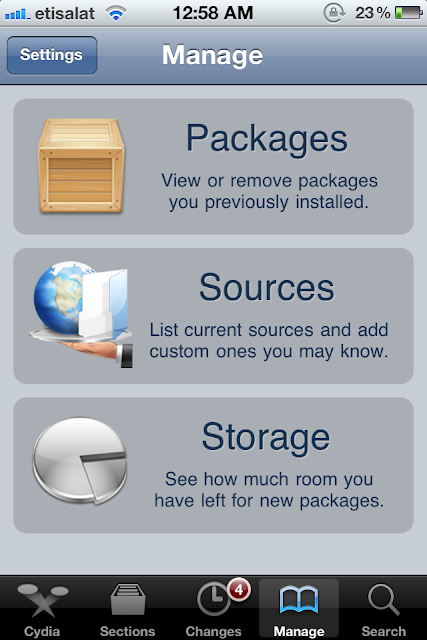
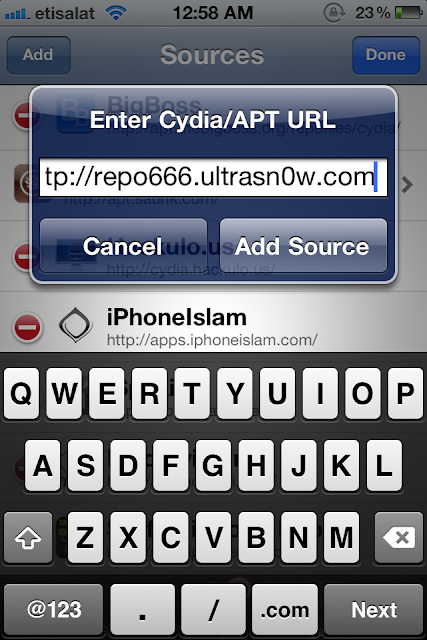
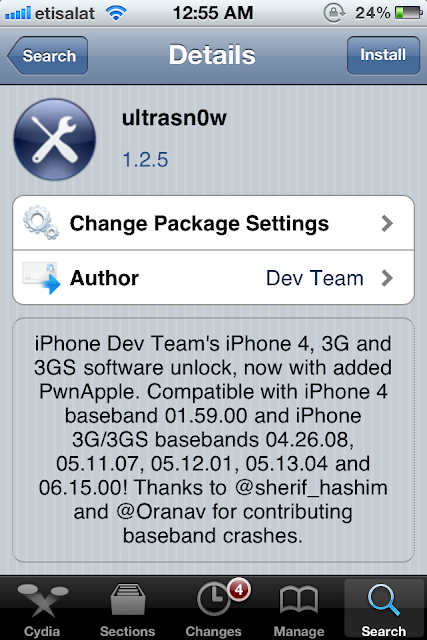
How to Unlock IOS 5.0.1 On iPhone 4 & iPhone 3, iPhone 3GS Through UltraSnow 1.2.5

In this guide I will explain in steps how to Unlock IOS 5.0.1 on iPhone 4, iPhone 3 and iPhone 3GS by using  Ultra Snow 1.2.5. First you will need Jailbroken iPhone 4, iPhone 3 or 3GS using latest RedSnow Version  0.9.9b9.


1st  Step:  You have to Jailbreak your iPhone 4, 3 or 3GS using the latest RedSnow
2nd Step: When Jailbreak finish Launch the installed "Cydia" Application
3rd Stpe: Go to the Manage Tab and select ADD


4th Spet: Add the URL in to POP UP Alert http://repo666.ultrasn0w.com


Last Step:  When CYdia has finished Install the UltraSnow Utility and your iPhone becomes your property


Get Real Racing 2 Now for iPhone 4S, iPad 2


Real Racing 2 best ever experiences on iPhone 4S when you love to play racing games with high definition graphics on iPhone 4, iPhone 4S, iPad 2 also on MAC Book. This Real Racing 2 is available in just 0.99 $ on iTunes Apple Store.
Best Feature you never see in other Racing Games

  • 30 officially licensed cars with unique features and characteristics.
  • 16 car grid action racing first time on IOS
  • 15 attractive and beautiful location with 40 miles detail race track
  • booked with latest ever models of cars, Nissan GT-R (R35), 2012 McLaren MPS4-12C
  • Win races and purchase new one model of your own choice
Types of Races
  • you can select Head to Head Races
  • Elimination Races, Single, Qualifier and Championship Races

Ways of Handling Real Racing 2

  • You can play on iPhone, iPad, Mac Book
  • you can control wirelessly on your HD Tv through AirPlay
  • Multi Player game with split screen with part play on iPhone 4S
  • you can play Real Racing online auto matched 16 Player
  • Play with friends locally on wi fi up to 8players


This Real Racing got 4+ Rated on web, thrilling and enjoyable racing game with high tech feature make it most favourable game. if you want to purchase this game follow link


Video of Real Racing 2, How it Looks on iPhone 4S


Stunning Moments images  on iPhone 4S of Real Racing 2


 You May like to read following Hot Topics


RedSnow 0.9.9 Beta 9 has Released: Download Now with More Features

Now RedSnow 0.9.9 Beta 9 has released with more upgraded and new features to control your iDevice. Following Features are added in this RedSnow 0.9.9 Beat Released

  • Native Support for IOS 5.0.1
  • iBooks fix for IOS 5
  • Ultra Snow capability has updated
  • It gives support to New iPhone 4 8GB
  • Windows user can create custom IPSW's with out Baseband updates


Download RedSnow 0.9.9 Beta 9 FOr Windows user Click Here     
Download RedSnow 0.9.9 Beta 9 for MAC OS X user Click Here

How to Jailbreak iPhone 4/iPhone3GS/iPad with Jailbreak 5.0/ IOS 5.0.1

you have seen lot of posts, How to Jailbreak iDevices, Especially iPhone 4, iPhone 3GS and iPad, But simple and best way is to visualize any process. When you will see following window you can quickly understand How to Jailbreak iPhone 4, iPhone 3GS or How Jailbreak iPad.


Version JAILBREAK 5.0
Devices you can Jailbreak iPhone 3GS, iPhone 4, iPAd, iPod Touch


You may find following topic interesting

iPhone 4S will Available in Russia, Brazil, Saudi Arabia


Apple Inc. has launched its best ever mobile phone in the name of iPhone 4S, All set record of iPhone selling has broken with iPhone 4S launch. More than one million units sold during first 24 hours of its launch. This demand not only come from USA but all over the world people struggling to get one iPhone 4S due to its most interesting application that is Siri !
with the launch of iPhone 4S, iPhone 4S becomes fastest selling device from all iDevices of Apple. Now Apple is coming with iPhone 4S in new market on 16Th December. Russia, Brazil populous countries of the world grab Apple to come here. And this will set new record of iPhone sale.


On 16Th December iPhone 4S will Launch in following countries
  • Brazil
  • Russia
  • Saudi Arabia
  • South Africa
  • Philippines
  • Taiwan
  • Malaysia
Local carriers from Brazil, Russia has launched thier promotional campaigns to sell iPhone 4S, These are all news comes from different sources.

Your Favourite Topics

Coffee Timer! for iPhone 4, iPhone 4S

Here Another exciting and tactful apps has introduced for Coffee lover, those who wants to make coffee with different taste and method and also they have iPhone, they can brew the perfect cup of Coffee with Coffee Timer. Coffee Timer gives you perfect timing and ingredients and also tell you how long it takes to brew your Coffee. 
This expert app Coffee Timer is available on Apple Apps Store Coffee Timer! in 1.99 $


coffee-timer-1 coffee-timer-2  coffee-timer-3

How to Unlock iPhone 4S with out Jailbreak


How to Unlock iPhone 4S, 4, 3GS without Jailbreak or Gevey SIM


Step 1: Insert original carrier AT&T SIM card
Step 2: Dial 611 for AT&T customer service hotline and drop the call
Step 3: Turn on Airplane Mode
Step 4: Take out AT&T SIM card
Step 5: Insert T-Mobile SIM card
Step 6: Make sure WiFi is off ( also tap on ‘Forget this Network” to make sure it doesn’t connect automatically later)
Step 7: Switch off Airplane Mode and iPhone will search for network. This is followed by the Apple splash screen appearing.
Step 8: Activation Required will be displayed on the screen
Step 9: EDGE network will activate automatically – notice the ‘E’ on the top left corner of the screen
Step 10: Wait for about 20-30 seconds and turn off the phone
Step 11: Turn on iPhone and the same Activation Required screen will be displayed
Step 12: When you see one signal bar, tap on Use Cellular Connection
Step 13: Eject SIM card
Step 14: Activation Required screen will be displayed the second time
Step 15: Insert SIM card - Unlocked!


Jailbreak iPhone 4, 3GS On Official iOS 5.0.1 Using RedSn0w 0.9.9b8


Apple released the official iOS 5.0.1 firmware yesterday to the public. This firmware update was released to fix bugs such as the battery draining bug that effected many users running iOS 5.0. Though we issued a warning not to update to the iOS 5.0.1 firmware, if you did or did not have a choice, you will be glad to know you can jailbreak iOS 5.0.1 tethered or semi-tethered usingRedSn0w 0.9.9b8. The only downfall to updating to iOS 5.0.1 is that you will most likely not be supported when the untethered iOS 5.0 jailbreak is released by the Dev-Team.
Note #1: Do not update to the iOS 5.0.1 firmware if you do not need to. You may not be able tojailbreak untethered in the future.
Note #2: This does not jailbreak the iPhone 4S.
Step 1) Download RedSn0w 0.9.9b8 for Mac OS X using the download mirror below or through theiJailbreak Downloads Section.
Step 2) Once you have downloaded RedSn0w you will need to launch it by double clicking on theredsn0w app.
Step 3) With RedSn0w 0.9.9b8 running you will need to click the Extras button. You will now see a few buttons presented to you. The button you are interested in is the Select IPSW button. Click this now and select your devices corresponding iOS 5.0 firmware.
Step 4) Upon selecting the iOS firmware click the back button, followed by the Jailbreak button.
Step 5) After clicking the Jailbreak button ensure that the “Install Cydia” option is checked, click theNext button and you will come to a screen where you will need to put your iPhone into DFU mode. Read through and follow the instructions presented to you which is to plug in and power off your iPhone and click the next button.
Step 6) When you click the next button you will need to follow the instructions presented to you to put your iPhone into DFU mode.
  • Hold down Power (corner) button for 5 seconds.
  • Without releasing the Power button, also hold down the Home (bottom center) button along with the Power button for 10 seconds.
  • Without releasing the home button, stop holding down the power button for up to 15 seconds.
Step 7) After you successfully enter DFU mode RedSn0w will begin jailbreaking your iPhone. DO NOT interrupt or use the computer during this time. When your iPhone is finished being jailbroken it will reboot into a jailbroken state.
Optional: Booting Tethered - When you jailbreak your iPhone running iOS 5.0.1 you will have atethered Jailbreak. Meaning in order for your iPhone to turn back on you will need to boot it using RedSn0w (this applies every time your iPhone loses power). To do this launch RedSn0w again and click the Extras Button > then click the Just boot button and you will need to put your iPhone into DFU mode again.
Note: Yes, you need to do this every time your iPhone loses power.
Optional: SemiTethered Jailbreak – Though you have now jailbroken your iPhone tethered oniOS 5.0.1, you can actually SemiTether your iPhone. SemiTethering your iPhone basically means that you will be able to still use it if it ever loses power (with limited functionality). In order to SemiTether your iPhone you will need to add the following repository through Cydia:
http://thebigboss.org/semitether
Search for the SemiTether Cydia package, install it and reboot your iPhone (yes, you will need to boot tethered again). If you are looking for a more detailed guide please click here.
You should now have a jailbroken iPhone 4, 3GS running iOS 5.0.1. 
This post get from ijailbreak.com and credit goes to ijailbreak Team.


© 2013 iPhone Quick Tips. All rights resevered. Designed by Templateism

Back To Top